Short answer: Starlink doesn’t sell a solar kit, and no solar panel plugs straight into a Starlink dish; the panel charges a battery or power station, and that battery runs the dish. Size it from your kit’s average draw, the hours you keep it on and your local sun, and expect a panel to deliver well below its rated watts in real conditions.
Last checked October 13, 2026.
For watt definitions, runtimes and the calculator, use our Starlink power hub. This page covers only the solar side.
How much power each Starlink kit uses
Swipe or scroll sideways to see the full table. With a keyboard, focus the table area and use the arrow keys.
| Kit | Average draw | Idle | Source |
|---|---|---|---|
| Starlink Mini | 25–40 W (spec sheet); Help Center: 20–40 W | 15 W | Starlink Help Center |
| Standard 4 and Standard 4 X | 75–100 W | 20 W | Starlink Help Center |
| Standard Actuated | 50–75 W | 20 W | Starlink Help Center |
| V5 | 35–50 W | Not listed | V5 spec sheet |
Starlink doesn’t publish snow-melt or peak wattage, so leave headroom in cold weather. The full watt table is in our Starlink power consumption guide.
How the pieces connect
Every working setup follows the same chain: panel, then a charge controller (often built into a power station), then a battery, then the Starlink power supply or a DC feed the kit accepts. Each Starlink kit needs its own power path, explained in our Starlink power supply guide.
- Mini: runs on DC or a 100 W USB-C source with Starlink’s Mini USB-C cable, so a station’s USB-C or DC output can feed it without an inverter. See Mini portable power and the Mini car adapter guide.
- Standard 4, Standard 4 X and V5: use their AC power supplies from a pure-sine outlet on a station or inverter. Starlink also offers DC-input supplies for Standard 4 and Standard 4 X (Starlink Help Center): the Standard DC-DC Power Supply (12–48 V input; available in select markets; check the Starlink shop) and the AC/DC Advanced Power Supply; there’s no DC option for V5. Details are in our Starlink 12V guide.
Sizing your panel
Work in three steps: daily energy, sun hours, then a loss allowance. The hub’s calculator does this for you; here’s one worked example so you can see the logic.
Math, not a test: a Mini averaging 30 W for 8 hours uses about 240 Wh. With 4 peak sun hours and about 25% losses, that needs roughly 240 ÷ (4 × 0.75) = 80 W of panel. A Standard 4 at 90 W for the same 8 hours needs roughly three times that. Use NREL PVWatts for sun hours at your location.
Swipe or scroll sideways to see the full table. With a keyboard, focus the table area and use the arrow keys.
| Factor | Why output falls short of the label |
|---|---|
| Sun angle and time of day | Ratings assume full, direct sun; mornings, evenings and winter give less. |
| Clouds and shade | Even partial shade on one cell can cut a panel’s output sharply. |
| Heat | Panels lose efficiency as they warm up. |
| Station input limits | A station caps current or voltage, so a bigger panel isn’t always used in full. |
| Conversion | Charging, storing and inverting each lose some energy. |
Battery matters as much as panel
Panels only help in daylight. For overnight use or cloudy days, the battery has to carry the load, so size it first, then add panel to refill it. Our Starlink backup power guide lists stations by model.
Panel and station pairings
Each panel below is matched to one station, because voltage, connector and input limits must line up. None of these connect directly to a dish.
As an Amazon Associate I earn from qualifying purchases.
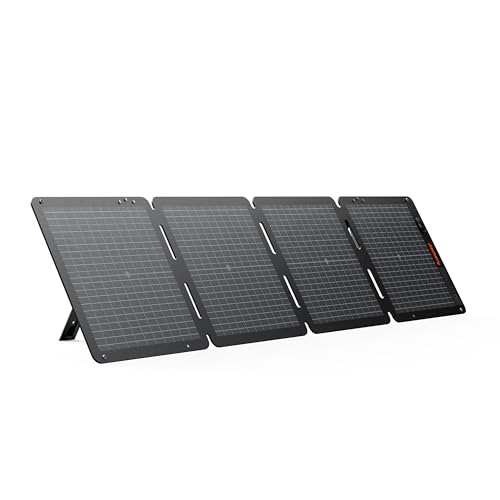
Jackery SolarSaga 100W Air (third-party)
Folding panel for recharging a Jackery Explorer 500 v2
Check the fitThird-party (not made by Starlink). Recharges a Jackery Explorer 500 v2 (solar input 16–60V, 200W max; this panel is 100W, 29.7V open-circuit). No direct connection to a Starlink dish. Not for Explorer 300/300 v2.
Check price on AmazonAs an Amazon Associate I earn from qualifying purchases.
Before you buy
Product source · checked 2026-10-13. Amazon shows current offers. Research-based guidance, not a hands-on test.

Jackery Explorer 500 v2 (512Wh)
Mid-size station for Starlink Mini
Check the fitRuns Starlink Mini via the USB-C1 port (100W, 20V/5A; USB-C2 is only 30W) with Starlink's Mini USB-C cable (needs 100W, 20V/5A), or from its AC outlet.
Check price on AmazonAs an Amazon Associate I earn from qualifying purchases.
Before you buy
Product source · checked 2026-10-13. Amazon shows current offers. Research-based guidance, not a hands-on test.

Renogy 200W solar panel (third-party)
Larger panel for recharging an Anker SOLIX C1000
Check the fitThird-party. Recharges an Anker SOLIX C1000; expect about 170–190W because the C1000 limits input to 10A below 32V. Needs an MC4-to-XT60 cable: Anker says to use a solar charger with an XT-60 connector, and this panel has MC4 leads. Don't pair with Jackery stations. No direct connection to a Starlink dish.
Check price on AmazonAs an Amazon Associate I earn from qualifying purchases.
Before you buy
Product source · checked 2026-10-17. Amazon shows current offers. Research-based guidance, not a hands-on test.

Anker SOLIX C1000
Long backup for Standard 4, V5 or Mini
Check the fitRuns Standard 4 (about 9–12 h), V5 (about 18–26 h) or Mini from its AC outlets; Mini can also use the 100 W USB-C port with Starlink's Mini USB-C cable (needs 100W, 20V/5A). Includes a car charging cable.
Check price on AmazonAs an Amazon Associate I earn from qualifying purchases.
Before you buy
Product source · checked 2026-10-13. Amazon shows current offers. Research-based guidance, not a hands-on test.
For a roof-mounted RV or van system with a separate charge controller and house battery, we don’t list a specific kit yet; size it with the same steps and see our 12V guide for the Starlink end.
Before you buy
- Check the station’s solar input voltage range and maximum watts against the panel’s open-circuit voltage and rating.
- Confirm the connector (MC4, XT60, DC8020) and whether an adapter cable is included.
- Keep cable runs sensible; our Starlink cable guide covers the dish side.
- Check service at your address on the Starlink map.
FAQ
Can I run Starlink straight off a solar panel?
No. A panel’s output rises and falls with the sun, so it has to charge a battery or station that then powers the kit.
How much solar do I need for Starlink?
It depends on your kit, hours online and sun. A Mini needs far less panel than a Standard 4; run your numbers in the power hub.
Does Starlink sell a solar panel?
No. Any panel you use is a third-party product.