Short answer: you only need the Starlink Ethernet Adapter if your Starlink router has no Ethernet port of its own, which in practice means the Gen 2 router (the one shipped with Standard Actuated kits). Router 3 (Gen 3) and Router Mini have built-in Ethernet ports. Check which router you have before buying anything: our Starlink router guide walks through it, and the accessory compatibility guide covers what else fits.
Last checked: October 10, 2026.
Do you need one? Kit by kit
Swipe or scroll sideways to see the full table. With a keyboard, focus the table area and use the arrow keys.
| Your setup | Built-in Ethernet? | Adapter needed for wired devices? |
|---|---|---|
| Standard Actuated with Gen 2 router | No | Yes |
| Router 3 (Gen 3) | Yes, two RJ45 ports behind a removable cover | No |
| Router Mini (included with V5 and Standard 4 kits) | Yes, one LAN and one WAN port (1 Gbps) | No |
| Starlink Mini | Yes, an RJ45 port behind the Starlink plug | No adapter. Use the Mini Starlink Cable to keep the IP67 rating; a standard Ethernet cable works but removes it |
Sources: Starlink’s Gen 3 router setup guide for Gen 2 kits, which says an Ethernet adapter is needed when a Gen 3 router is used as the base router on a Gen 2 system; the Router Mini install guide; the V5 specification sheet; Starlink’s support article on the Gen 2 router; and the Starlink Mini kit guide. Not sure which dish or router you own? Use our model history guide.
When a wired connection is worth it
- Desktop PCs, game consoles or smart TVs that sit near the router and benefit from a steady link.
- Connecting your own third-party router or mesh system.
- Wiring a second Starlink router back to the main one. Starlink recommends a shielded Cat5e-or-better cable for router-to-router links (V5 specification sheet).
If all your devices are wireless and coverage is fine, you don’t need one.
Setting it up
- Power down the Gen 2 router.
- Disconnect the Starlink cable from the router and plug it into the adapter.
- Connect the adapter’s short cable to the router.
- Run an Ethernet cable from the adapter’s port to your device or own router, then power everything back on.
Follow the instructions that come with the adapter if they differ. If you’re using your own router, the Starlink app has a bypass option that turns off Starlink’s Wi-Fi. Use it only if you want your router to handle everything; to turn bypass off again you have to factory reset the Starlink router (Starlink Standard kit guide).
Troubleshooting
- No connection on the wired device: reseat both ends of the Starlink cable and the adapter connection, then try a different Ethernet cable.
- Wi-Fi disappeared: check whether bypass mode is on (on Router 3 and Router Mini, the light turns violet for about an hour, per Starlink: router and power supply lights; the Gen 2 router has no bypass light, so check the Starlink app). Undoing it requires a factory reset; see the router reset guide.
- Still stuck: follow our router reset guide for your router model before replacing hardware.
Where to buy
Buy the Ethernet Adapter from the Starlink shop: sign in to your Starlink account (or open the app) and look under Shop, so you know it matches your kit. Check the current price there. As an Amazon Associate I earn from qualifying purchases. Comparing kits? See the kit comparison buying guide.
Cables, adapters and Ethernet extras
These are third-party accessories, not made by Starlink unless stated. Starlink-plug adapters and couplers only fit the plug types their listings name, and dish cables are model-specific, so match the plug to your kit before buying. Bulk Ethernet cable and RJ45 surge protectors belong on plain Ethernet runs, never inline on the Starlink dish cable.
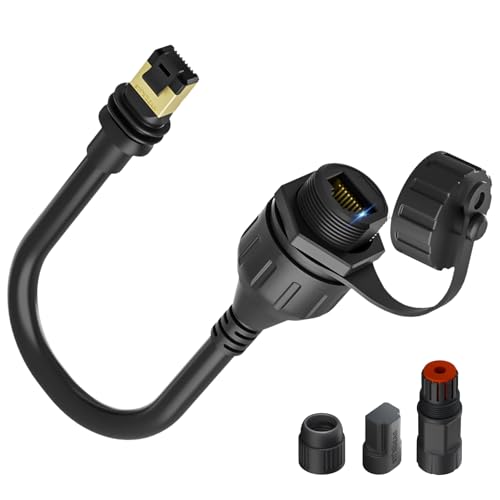
STARGEAR Ethernet Adapter for Gen 3/Mini, 1 ft (third-party)
Wired Ethernet from a Gen 3 or Mini Starlink plug
Check the fitThird-party (not made by Starlink). Starlink plug-to-RJ45 adapter per listing: Gen 3/Mini. Keep runs under 175 ft, use Cat6, no couplers.
Check price on AmazonAs an Amazon Associate I earn from qualifying purchases.
Before you buy
Product source · checked 2026-10-10. Amazon shows current offers. Research-based guidance, not a hands-on test.

STARGEAR Starlink Cable, 75 ft, Gen 2 (third-party)
Longer replacement dish cable for a Standard Actuated kit
Check the fitThird-party Gen 2 (Standard Actuated) cable; not for Standard/Gen 3 or Mini. Starlink sells official replacements.
Check price on AmazonAs an Amazon Associate I earn from qualifying purchases.
Before you buy
Product source · checked 2026-10-10. Amazon shows current offers. Research-based guidance, not a hands-on test.

STARGEAR Starlink Cable Gen 3, 15 m (third-party)
Replacement dish cable for Gen 3-style plugs
Check the fitThird-party Gen 3-style cable; listing claims Standard 4/4X/V4/V5/Mini; Starlink sells model-specific cables; verify the plug for your kit.
Check price on AmazonAs an Amazon Associate I earn from qualifying purchases.
Before you buy
Product source · checked 2026-10-10. Amazon shows current offers. Research-based guidance, not a hands-on test.