Starlink off-grid power calculator
How long will your battery last? Choose your dish and see what it takes to stay connected off grid.
ESTIMATED CONTINUOUS RUNTIME
—Enter your setup below.
Battery and solar sizing use the higher draw in the range.
Explore power gear →A battery estimate, with the assumptions visible.
Runtime excludes solar charging. Solar sizing estimates enough daily harvest to replace that day’s use; it does not model weather, shading, charge limits or the timing of sunlight. Battery sizing assumes no recharging during your selected days.
Cold, snow melting, startup and heavy use can push draw above the average range. These results do not size surge output, confirm cable compatibility or guarantee continuous service. Use measured total draw for your own setup.
Power figures & sources
Checked October 11, 2026. Starlink’s power guidance provides AC-input averages including the kit’s router, supply and cables: Mini 20–40 W; Standard 4 / 4 X 75–100 W; Standard Actuated 50–75 W; Performance Gen 1 / Gen 2 110–150 W.
The Mini specification sheet instead lists 25–40 W; this calculator uses the broader 20–40 W help-center range. A 100 W USB-PD source requirement is an output-capability requirement, not a claim of constant 100 W consumption.
The V5 sheet lists 35–50 W and the Performance Gen 3 sheet lists 75–100 W. Their measurement boundaries are less explicit; confirm total draw, including your router. Older round kits and modified DC setups can use measured/custom draw.
How the math works
Usable Wh = rated Wh × usable percentage. For Ah batteries, rated Wh = Ah × nominal volts. Battery-side W = (Starlink W + other devices W) ÷ delivery efficiency + overhead W. Runtime = usable Wh ÷ battery-side W.
Daily Wh = battery-side W × powered hours. Battery size = higher daily Wh × days ÷ usable percentage, rounded up to 50 Wh. Solar array W = higher daily Wh ÷ (peak sun hours × harvest efficiency), rounded up to 10 W. Solar efficiency accounts for charging losses; delivery efficiency accounts for discharge/conversion losses. No result is a maximum-load electrical rating.
THE DISHWITS POWER LIBRARY
Every power guide, in one place
Start with the question you need answered, then return to the calculator with your setup’s numbers.
Batteries, supplies & off-grid planning
Dish-specific power & cable checks
BUILD A SYSTEM AROUND YOUR DAY
How to power Starlink off grid
An off-grid Starlink setup needs three things to agree: the dish’s power requirements, the battery’s available energy, and a way to replace the energy you use. A battery with plenty of capacity can still have the wrong output. A powerful charger can still be connected to a battery that is too small for an overnight session. Work through the connection first, then runtime, then recharging.
Identify your dish, supply and required output port.
Choose powered hours, other loads and days between charges.
Plan vehicle, mains or solar charging for the actual trip.
See the two power paths, illustrated

Starlink watts, watt-hours and amp-hours: what each number means
Watts (W) describe the rate at which a device uses energy. Watt-hours (Wh) describe an amount of energy. A constant 40 W load uses 320 Wh over eight hours before any extra battery-to-output losses. A power station’s 1,000 W output rating tells you about the load it can supply; it does not tell you how many hours it will last.
Amp-hours (Ah) need a voltage before they can be compared with a power station’s Wh rating. For example, a battery rated at 100 Ah and 12.8 V stores a nominal 1,280 Wh. A different nominal voltage produces a different result. For USB power banks, use the manufacturer’s Wh figure where available; multiplying the advertised mAh by the USB output voltage can overstate stored energy.
How much power does each Starlink use?
Starlink’s AC power guidance lists average ranges of 20–40 W for Mini, 50–75 W for Standard Actuated, 75–100 W for Standard 4 / 4 X, and 110–150 W for Performance Gen 1 / Gen 2. Those figures include the kit’s router, supply and cables. They are average operating figures, not maximum or startup ratings.
The V5 specification sheet lists a 35–50 W average, while the Performance Gen 3 sheet lists 75–100 W. Keep those generations separate. Where a specification does not clearly define the measurement boundary, measure the whole setup and account for a separate router. The calculator’s source notes explain the differences between the manufacturer documents.
How long will a battery run Starlink?
Start with usable energy rather than assuming you can spend every rated watt-hour. Reserve settings, battery condition and the power station’s cutoff affect what is available. Then account for the loss between the battery and the outlet you are using. A result based on average draw should be a planning range, especially when temperature and traffic change.
As a worked example, a nominal 500 Wh battery with 90% usable energy gives a 450 Wh energy budget. Supplying a 30 W load through an assumed 85% efficient delivery path draws about 35.3 W from that budget, giving roughly 12.8 hours without recharging. These are illustrative assumptions, not a promise for a particular power station. Enter measured values to make the estimate more useful.
Daily powered hours change daily energy use, not continuous runtime. Running for eight hours and fully switching off for sixteen is different from leaving the kit idle. This calculator assumes the kit and its output are off outside the hours entered. Include any always-on networking or standby loads in a separate energy budget.
Choosing between a power bank, power station and UPS
A compact power bank can suit a portable setup when its individual output port supports the required voltage, current and protocol. Look beyond a combined wattage advertised across multiple ports. Connecting a second device may change how power is shared. Confirm the compatible Starlink cable and the power source’s specifications together.
A power station adds a larger energy store and often an AC outlet, which can let you use the kit’s supplied AC equipment. Check its rated capacity, sustained output, idle consumption and recharging options. A DC-only unit needs a verified DC or USB power route; the absence of an AC outlet matters even if its battery capacity looks sufficient.
A UPS is useful for bridging an outage, but choose it using its runtime curve at the load you expect. VA and output watts are not interchangeable with battery Wh. Do not type a UPS’s VA rating into the calculator’s capacity field. If battery energy is not specified, use the manufacturer’s runtime guidance instead of inventing a capacity.
Starlink Mini on USB-C, vehicle power and 12 V systems
For Mini, Starlink’s specification sheet states a 100 W, 20 V / 5 A USB-PD source requirement with its compatible USB-C accessory. That is a source-capability requirement, not a claim that Mini continuously consumes 100 W. Average consumption and required source output answer different questions.
In a vehicle, confirm the charger’s supported input range, the socket rating and the capability of the particular port being used. Decide whether you will charge only while driving or also draw from a parked vehicle’s battery. The calculator estimates energy; it does not assess wiring, fuses, battery isolation or engine-start reserve. Follow the equipment and vehicle manufacturers’ installation requirements.
Do not assume that a cable which physically fits converts voltage or negotiates USB Power Delivery. Direct-DC changes also alter the measurement boundary: if you enter battery-side measured watts, set delivery efficiency to 100% and overhead to zero so losses are not counted again.
How much solar do you need for Starlink?
Size solar from daily energy, local seasonal sunlight and realistic losses—not the number printed on a panel alone. Peak sun hours represent an equivalent duration at full solar intensity, not the time between sunrise and sunset. Shade, orientation, temperature and charging limits can all change what reaches the battery.
The calculator divides the higher daily energy estimate by peak sun hours and the selected harvest efficiency. That estimates a panel nameplate capacity to replace an average day’s use. It does not simulate cloudy sequences, whether charging overlaps your usage, or the extra energy needed to refill a deeply discharged battery while also running Starlink.
Use location-specific solar resources when planning. The PVWatts results guide explains why modeled production based on representative weather can differ from actual monthly output. Its grid-connected estimates are useful context for solar variability, not a guarantee of off-grid battery autonomy. Check panel voltage and current limits against your charge controller or power station separately.
Planning for a weekend, an RV or a remote cabin
For occasional travel, list the hours you actually need connectivity and every other device sharing the battery. For an RV, separate drive-time charging from parked use. For a cabin, build a full daily energy budget that includes networking and other essential loads. A Starlink-only estimate is not a whole-home battery plan.
The days-without-charging setting sizes storage for the selected daily schedule with no recharge during that period. The solar result separately sizes replacement of one day’s use. Consider those two jobs together: storage carries you through gaps in charging; generation replenishes what was used. Before a longer trip, test the complete system through a realistic workday and record its actual energy use.
COMPARE THE HARDWARE
Power products for Starlink setups
19 current product listings across batteries, backup power, chargers, cables and protection. Check each card’s dish and connection notes before buying. Purchases are completed on Amazon.
As an Amazon Associate I earn from qualifying purchases. Product cards appear when their current listing and editorial checks are available; this is not a compatibility guarantee.
Power stations & solar generators
Compare stored energy, the output you will use, and how you plan to recharge.

Anker SOLIX C1000
Long backup for Standard 4, V5 or Mini
Check the fitRuns Standard 4 (about 9–12 h), V5 (about 18–26 h) or Mini from its AC outlets; Mini can also use the 100 W USB-C port with Starlink's Mini USB-C cable (needs 100W, 20V/5A). Includes a car charging cable.
Check price on Amazon Read the guide →As an Amazon Associate I earn from qualifying purchases.
Before you buy
Product source · checked 2026-10-13. Amazon shows current offers. Research-based guidance, not a hands-on test.

Jackery Explorer 1000 v2
Long backup for Standard 4, V5 or Mini
Check the fitRuns Standard 4 (about 9–12 h), V5 or Mini via AC; Mini can also use the 100 W USB-C port with Starlink's Mini USB-C cable (needs 100W, 20V/5A), not the 30 W one.
Check price on Amazon Read the guide →As an Amazon Associate I earn from qualifying purchases.
Before you buy
Product source · checked 2026-10-13. Amazon shows current offers. Research-based guidance, not a hands-on test.

Anker SOLIX C200 DC (192Wh)
Half-day Starlink Mini power without an AC outlet
Check the fitDC-only (no AC outlet): Starlink Mini only, via its 140W USB-C port and Starlink's Mini USB-C cable (needs 100W, 20V/5A); about 4–7 h. Cannot run Standard, Standard 4 or V5 kits.
Check price on Amazon Read the guide →As an Amazon Associate I earn from qualifying purchases.
Before you buy
Product source · checked 2026-10-10. Amazon shows current offers. Research-based guidance, not a hands-on test.

Anker SOLIX C300 DC (288Wh)
Day-long Starlink Mini power without an AC outlet
Check the fitDC-only (no AC outlet): Starlink Mini only, via its 140W USB-C port and Starlink's Mini USB-C cable (needs 100W, 20V/5A); about 6–10 h. Cannot run Standard, Standard 4 or V5 kits.
Check price on Amazon Read the guide →As an Amazon Associate I earn from qualifying purchases.
Before you buy
Product source · checked 2026-10-10. Amazon shows current offers. Research-based guidance, not a hands-on test.

GENDOME StarGrid 288Wh kit (third-party)
All-in-one Starlink Mini battery kit
Check the fitThird-party (not made by Starlink). About 6–10 h for Starlink Mini (25–40 W average; math, not a test).
Check price on Amazon Read the guide →As an Amazon Associate I earn from qualifying purchases.
Before you buy
Product source · checked 2026-10-10. Amazon shows current offers. Research-based guidance, not a hands-on test.

Jackery Explorer 500 v2 (512Wh)
Mid-size station for Starlink Mini
Check the fitRuns Starlink Mini via the USB-C1 port (100W, 20V/5A; USB-C2 is only 30W) with Starlink's Mini USB-C cable (needs 100W, 20V/5A), or from its AC outlet.
Check price on Amazon Read the guide →As an Amazon Associate I earn from qualifying purchases.
Before you buy
Product source · checked 2026-10-13. Amazon shows current offers. Research-based guidance, not a hands-on test.
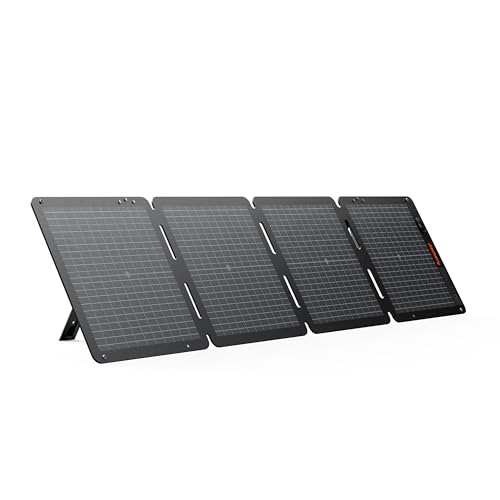
Jackery SolarSaga 100W Air (third-party)
Folding panel for recharging a Jackery Explorer 500 v2
Check the fitThird-party (not made by Starlink). Recharges a Jackery Explorer 500 v2 (solar input 16–60V, 200W max; this panel is 100W, 29.7V open-circuit). No direct connection to a Starlink dish. Not for Explorer 300/300 v2.
Check price on Amazon Read the guide →As an Amazon Associate I earn from qualifying purchases.
Before you buy
Product source · checked 2026-10-13. Amazon shows current offers. Research-based guidance, not a hands-on test.

Renogy 200W solar panel (third-party)
Larger panel for recharging an Anker SOLIX C1000
Check the fitThird-party. Recharges an Anker SOLIX C1000; expect about 170–190W because the C1000 limits input to 10A below 32V. Needs an MC4-to-XT60 cable: Anker says to use a solar charger with an XT-60 connector, and this panel has MC4 leads. Don't pair with Jackery stations. No direct connection to a Starlink dish.
Check price on Amazon Read the guide →As an Amazon Associate I earn from qualifying purchases.
Before you buy
Product source · checked 2026-10-17. Amazon shows current offers. Research-based guidance, not a hands-on test.
Portable batteries & power banks
Check per-port output and the exact cable—not just total advertised watts.

Anker Laptop Power Bank (25K, 165W)
General USB-C power bank; Starlink Mini use unconfirmed
Check the fitUnconfirmed for Starlink Mini; needs a sustained 100 W (20V/5A) port.
Check price on Amazon Read the guide →As an Amazon Associate I earn from qualifying purchases.
Before you buy
Product source · checked 2026-10-10. Amazon shows current offers. Research-based guidance, not a hands-on test.
UPS & outage backup
Compare the manufacturer’s runtime curve at your load. VA is not battery capacity in Wh.

APC Back-UPS BE600M1
Rides out short outages on a home Starlink kit
Check the fitShort outage bridge: about 23–35 min for a Standard kit (75–100 W), about 50–90 min for Starlink Mini or V5 (estimates from APC's runtime chart). Stepped-sine output; not a long-outage solution.
Check price on Amazon Read the guide →As an Amazon Associate I earn from qualifying purchases.
Before you buy
Product source · checked 2026-10-10. Amazon shows current offers. Research-based guidance, not a hands-on test.

CyberPower ST625U
Rides out brief outages on a home Starlink kit
Check the fitShort outage bridge: roughly 15–25 min for a Standard kit (75–100 W), about 40–60 min for Starlink Mini or V5 (estimates). Simulated-sine output.
Check price on Amazon Read the guide →As an Amazon Associate I earn from qualifying purchases.
Before you buy
Product source · checked 2026-10-10. Amazon shows current offers. Research-based guidance, not a hands-on test.

CyberPower EC850LCD
Rides out short outages on a home Starlink kit
Check the fitAbout 20–30 min for a Standard kit on battery. Plug Starlink into a battery-backup outlet, not an ECO outlet. Simulated-sine output.
Check price on Amazon Read the guide →As an Amazon Associate I earn from qualifying purchases.
Before you buy
Product source · checked 2026-10-10. Amazon shows current offers. Research-based guidance, not a hands-on test.
Vehicle chargers
Match the vehicle socket rating and one-port output to your Starlink power route.

Anker Nano Car Charger 167.5W, model A2737 (Amazon lists B2737) (third-party)
Car charger for Starlink Mini via its 100W USB-C1 port
Check the fitThird-party (not made by Starlink). Use USB-C1 (100 W) with Starlink's Mini USB-C cable (needs 100W, 20V/5A) for Starlink Mini; USB-C2 (45 W) won't run it. Check your 12 V socket's fuse rating.
Check price on Amazon Read the guide →As an Amazon Associate I earn from qualifying purchases.
Before you buy
Product source · checked 2026-10-10. Amazon shows current offers. Research-based guidance, not a hands-on test.
Power cables & supplies
The exact dish, voltage and connector matter. Data and power cables are not interchangeable.

STARGEAR Mini 12V car cable, 10 ft (third-party)
Runs a Starlink Mini from a vehicle 12V socket
Check the fitThird-party 12V cable for Starlink Mini; Starlink's IP67 rating applies only with Starlink's own cable. Expect about 0.4 V drop at 5 A; best with the engine running.
Check price on Amazon Read the guide →As an Amazon Associate I earn from qualifying purchases.
Before you buy
Product source · checked 2026-10-10. Amazon shows current offers. Research-based guidance, not a hands-on test.

STARGEAR Mini 12V car cable, 16.4 ft (third-party)
Longer 12V run for a Starlink Mini
Check the fitThird-party 12V cable for Starlink Mini; Starlink's IP67 rating applies only with Starlink's own cable. Longer run (about 0.65 V drop at 5 A) is riskier at 12 V; prefer the 10 ft.
Check price on Amazon Read the guide →As an Amazon Associate I earn from qualifying purchases.
Before you buy
Product source · checked 2026-10-10. Amazon shows current offers. Research-based guidance, not a hands-on test.

STARGEAR Starlink Cable, 75 ft, Gen 2 (third-party)
Longer replacement dish cable for a Standard Actuated kit
Check the fitThird-party Gen 2 (Standard Actuated) cable; not for Standard/Gen 3 or Mini. Starlink sells official replacements.
Check price on Amazon Read the guide →As an Amazon Associate I earn from qualifying purchases.
Before you buy
Product source · checked 2026-10-10. Amazon shows current offers. Research-based guidance, not a hands-on test.

STARGEAR Starlink Cable Gen 3, 15 m (third-party)
Replacement dish cable for Gen 3-style plugs
Check the fitThird-party Gen 3-style cable; listing claims Standard 4/4X/V4/V5/Mini; Starlink sells model-specific cables; verify the plug for your kit.
Check price on Amazon Read the guide →As an Amazon Associate I earn from qualifying purchases.
Before you buy
Product source · checked 2026-10-10. Amazon shows current offers. Research-based guidance, not a hands-on test.

Renogy P2 700W pure-sine inverter (third-party)
Hardwired 12V inverter for any Starlink AC power supply
Check the fitThird-party pure-sine inverter. Hardwire to a 12V battery (not a cigarette socket) to run any Starlink AC power supply; a 100W Standard draws about 9–10A at 12V. Idle draw under 0.8A (about 10W) adds to small loads like a Mini.
Check price on Amazon Read the guide →As an Amazon Associate I earn from qualifying purchases.
Before you buy
Product source · checked 2026-10-13. Amazon shows current offers. Research-based guidance, not a hands-on test.

BESTEK 300W pure-sine inverter (third-party)
12V-socket inverter for Mini or V5 power supplies
Check the fitThird-party pure-sine inverter for a 12V socket. Fine for Starlink Mini or V5 power supplies. A Standard 4 or 4 X (75–100W) needs a 15A socket and the engine running; on a 10A socket it may blow the fuse. For Standard kits, prefer a hardwired inverter. Starlink lists Standard 4 and 4 X at 75–100W average but publishes no peak draw.
Check price on Amazon Read the guide →As an Amazon Associate I earn from qualifying purchases.
Before you buy
Product source · checked 2026-10-17. Amazon shows current offers. Research-based guidance, not a hands-on test.
Starlink off-grid power questions
Can Starlink run on a battery?
Yes, with a suitable supply path and enough usable energy. Check the dish model, output voltage and protocol, compatible cable and required output capability before calculating runtime. A battery’s capacity alone cannot confirm that it will power the kit.
How long will Starlink run on a 1,000 Wh power station?
It depends on the kit and usable output energy. With the calculator’s 90% usable and 85% delivery assumptions, a constant 30 W load runs for about 25.5 hours. A constant 87.5 W load runs for about 8.7 hours. Both exclude charging and extra devices; they are examples, not product-specific tests.
Is a 100 W panel enough for Starlink?
It depends on daily powered hours and the energy actually harvested. At four peak sun hours and 75% harvest efficiency, a 100 W array contributes an estimated 300 Wh per day to the battery budget. Compare that with the calculator’s daily battery consumption, including delivery losses. Longer usage, less sunlight or other devices can make it insufficient.
Can I leave Starlink running overnight?
Plan enough usable battery energy for the full overnight period without relying on solar production. Include the router, other devices and power-system losses. The calculator’s continuous runtime estimate assumes no recharge and starts with a fully charged battery subject to your selected usable percentage.
Will a larger power station make Starlink faster?
The calculator does not predict speed. Its purpose is to estimate energy needs for a correctly powered setup. More stored energy can extend runtime; it does not establish a faster service tier or improve an obstructed sky view.
Why is measured runtime different from the estimate?
Average load, battery condition, reserve settings, conversion efficiency and standby consumption may differ from the assumptions. Measure energy over a representative session and check whether the measurement is at the battery or output. Update the custom draw and efficiency fields without counting the same losses twice.