Short answer: yes, most online games play fine on Starlink: Starlink’s own specifications list typical latency of 25–60 ms on land, though it’s higher in some remote places and varies more than cable or fiber. Your biggest gains come from a wired connection and from understanding Starlink’s CGNAT, which can cause strict NAT types and hosting problems on Residential and Roam plans.
Last checked October 14, 2026.
Latency: Starlink’s figures and Ookla’s
Swipe or scroll sideways to see the full table. With a keyboard, focus the table area and use the arrow keys.
| Source | What it measures | Figure |
|---|---|---|
| Starlink specifications | Typical range Starlink states for users | 25–60 ms on land; 100+ ms in certain remote locations (Starlink) |
| Starlink network update (operator-measured) | Median peak-hour latency from Starlink routers across US customers, as of June 2025 | 25.7 ms; fewer than 1% of measurements above 55 ms (Starlink) |
| Ookla Speedtest (independent, user-run) | Median multi-server latency by state, second half of 2025 | 10 states under 40 ms; national median 39 ms in Q1 2026 (Ookla) |
The figures differ because the methods differ: Starlink measures from its routers, while Ookla’s numbers come from tests users run on their own devices and connections. Neither is a Dishwits test.
What affects gaming on Starlink
Swipe or scroll sideways to see the full table. With a keyboard, focus the table area and use the arrow keys.
| Factor | What Starlink documents | What you can do |
|---|---|---|
| Latency | 25–60 ms typical on land; higher in some remote areas | Check your area on the Starlink map |
| Obstructions | Blocked sky view causes interruptions | Clear the view; see installation planning |
| Wi-Fi vs wired | Starlink measures latency from its router | Use Ethernet for your console or PC |
| CGNAT | Residential and Roam: 1,200 concurrent sessions; gaming issues listed as a symptom (Starlink) | See public IP and CGNAT |
| Data | Roam plans can have data allowances | Allow for large game downloads; see US plans |
Ping and jitter in plain terms
Ping is the round trip time for a packet; jitter is how much that time varies. Fast shooters and fighting games feel jitter most, while turn-based, strategy and most co-op games are forgiving. Starlink’s latency target is a stable 20 ms median, which it says it’s working toward (Starlink).
Which plan suits gamers
Residential and Roam plans use CGNAT. Starlink says Priority plans include a public IP address and don’t have CGNAT session limits (Starlink). Most players don’t need Priority; it matters mainly if you host servers or keep hitting NAT problems. Compare plans in our US plans guide.
Set up a wired connection
- Standard 4 and Standard 4 X: their routers have Ethernet ports; see our router guide.
- Starlink Mini: it has one latching Ethernet LAN port behind the Starlink Plug; use Starlink’s Mini cable or your own Ethernet cable (a standard RJ45 cable removes the IP67 rating), or a labeled third-party adapter. Older Gen 2 kits need Starlink’s Ethernet Adapter. Our Ethernet adapter guide covers which kits need one.
As an Amazon Associate I earn from qualifying purchases.
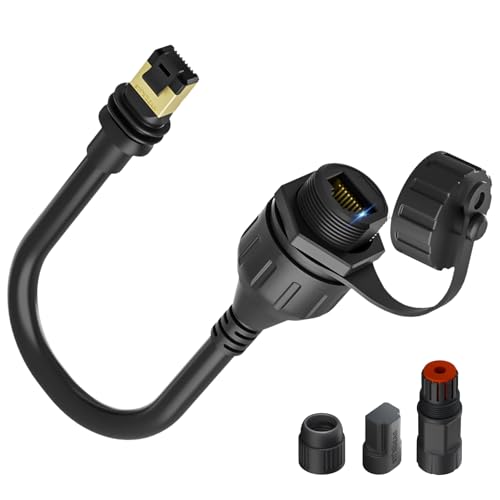
STARGEAR Ethernet Adapter for Gen 3/Mini (third-party)
Wired Ethernet from a Gen 3 or Mini Starlink plug
Check the fitThird-party adapter that adds a wired Ethernet port to Gen 3 and Mini kits, per its listing.
Check price on AmazonAs an Amazon Associate I earn from qualifying purchases.
Before you buy
Product source · checked 2026-10-14. Amazon shows current offers. Research-based guidance, not a hands-on test.
NAT type, CGNAT and hosting
CGNAT blocks inbound connections, which can show up as a strict or moderate NAT type and makes hosting matches or game servers hard. Starlink’s routers don’t support port forwarding (Starlink). If you need inbound connections, read our Starlink public IP guide and the bypass mode guide. These routers are examples people use in bypass mode, not a ranking:
Consoles
For a PS5 or Xbox, a wired connection is the main thing to do. Starlink doesn’t publish console-specific guidance.
Dropouts and lag spikes
Short dropouts usually come from obstructions or weak Wi-Fi. See installation planning, mesh Wi-Fi, performance troubleshooting and is Starlink down?. Future capacity is covered in our V3 satellites story. Buying a kit? See the Standard 4 X and Mini guides, and check country coverage on our availability map.
FAQ
Does Starlink work well for gaming?
For most games, yes. Starlink names online gaming among suitable uses, with 25–60 ms typical latency on land.
Which Starlink plan is best for gaming?
Any plan works for playing. Priority adds a public IP, which matters for hosting or NAT issues.
Can you play PS5 on Starlink?
Yes. Use a wired connection where you can.
How long does 100GB last?
It depends on your downloads: large game installs and updates use the most. Check your usage in the Starlink app.