Short answer: Starlink doesn’t offer a truly static IP. Residential and Roam plans use CGNAT, which blocks inbound IPv4 connections, while Local and Global Priority plans can switch on a public IPv4 that Starlink reserves through reboots but that can change if you move the dish or after a software update.
Last checked October 14, 2026.
IP options by plan
Swipe or scroll sideways to see the full table. With a keyboard, focus the table area and use the arrow keys.
| Residential / Roam | Local / Global Priority | |
|---|---|---|
| IPv4 | CGNAT (private address from 100.64.0.0/10) | Optional public IPv4 (reserved, not static) |
| Inbound IPv4 | Blocked | Reachable with the public IP policy |
| IPv6 | Native; /56 prefix delegated | Native; /56 prefix delegated |
| Session limit | 1,200 concurrent sessions | No CGNAT session limits |
| Blocked outbound | TCP/25 and TCP/445 | TCP/25 and TCP/445 |
Sources: What IP address does Starlink provide? and CGNAT session limits (Starlink Help Center).
CGNAT in plain words
With CGNAT, many customers share public IPv4 addresses, so nobody on the internet can start a connection to you. Starlink caps Residential and Roam at 1,200 concurrent sessions; when that’s reached, new sessions drop the oldest. Starlink lists symptoms such as dropped VoIP calls, frozen video meetings, and issues with gaming and VPNs, and suggests a Priority plan for heavy users (Starlink).
Static, public or reserved?
Starlink says “truly static IPs are not available.” Its public IPv4 uses a reservation that keeps the address and IPv6 prefix when the dish is off or rebooted, but relocating it or a software update may change them. Starlink may also briefly show addresses from two points of presence, for about 10 minutes, when your cell moves to a different PoP (Starlink).
How to turn on a public IPv4
Only Local and Global Priority plans offer it (an older Starlink article lists it for “Priority, Mobile Priority, and Maritime” customers; Residential and Roam don’t get it either way). Starlink’s steps (Starlink Help Center):
- Sign in at starlink.com/account and open the Account tab.
- Choose Subscriptions, then the service line.
- Select Edit next to IP Policy, choose Public IP and save.
- Reboot your Starlink.
Business accounts can also do this from the Dashboard tab. Starlink says Local Priority customers can see the public IP at the top of the Devices section on the service line page.
Port forwarding
Starlink’s routers don’t support port forwarding or firewall rules. Starlink says port forwarding needs a third-party router that supports it and a public IP on your service (Starlink). Put that router in bypass mode; see our bypass mode guide. The Mini has its own Ethernet LAN port behind the Starlink Plug (a standard RJ45 cable removes its IP67 rating); older Gen 2 kits need Starlink’s Ethernet Adapter. See our Ethernet adapter guide.
As an Amazon Associate I earn from qualifying purchases.
Routers people use in bypass mode (examples, not a ranking):
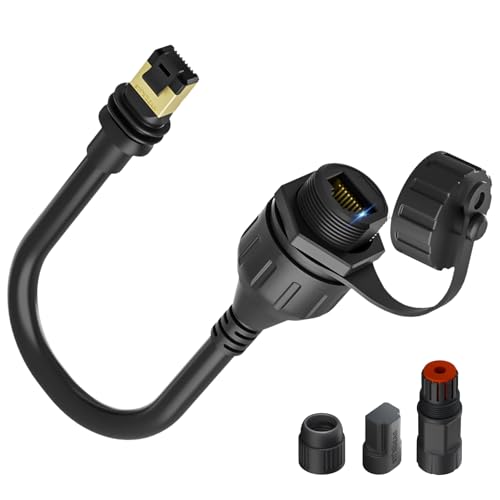
STARGEAR Ethernet Adapter for Gen 3/Mini (third-party)
Wired Ethernet from a Gen 3 or Mini Starlink plug
Check the fitThird-party adapter that adds a wired Ethernet port to Gen 3 and Mini kits, per its listing.
Check price on AmazonAs an Amazon Associate I earn from qualifying purchases.
Before you buy
Product source · checked 2026-10-14. Amazon shows current offers. Research-based guidance, not a hands-on test.
The IPv6 route
Every plan gets native IPv6, and Starlink says customers needing inbound traffic should consider a third-party router (Starlink). Inbound over IPv6 depends on your own router’s firewall and the remote side supporting IPv6; set firewall rules carefully, because the Starlink router can’t filter them for you.
Remote access without a public IP
VPN or tunnel services that connect outward from your network can reach devices behind CGNAT. We don’t recommend a specific provider.
Related: router guide, Router Mini, mesh Wi-Fi, US plans, Starlink for gaming, troubleshooting and the router reset guide.
FAQ
Can Starlink do port forwarding?
Not on Starlink’s routers. You need a public IP plan and a third-party router.
Are Starlink IP addresses dynamic?
Yes. Even public IPs are reserved rather than static and can change after a move or software update.
Can I change my Starlink IP location?
Your IP comes from the point of presence serving your area, and Starlink may move cells between PoPs.